TRIPS Itinerary Automation: Travel Associates

This article applies to:
- Travel Associates Australia
- Travel Associates New Zealand

With the launch of Trips Automation, HELiO will automatically push all fully paid or cancelled bookings and updates to Trips, ensuring that every customer has an up-to-date itinerary and access to their trip in the Travel Associates app at least 2 weeks before their scheduled departure.
What do I need to know?
Automation into Trips for Travel Associates Australia
- Every FULLY PAID HELiO booking will be automatically sent to TRIPS within an hour after the booking is in FULLY PAID status.
- When in FULLY PAID status, any change to the booking in HELiO will trigger a sync with TRIPS approximately 1 hour after the change, ensuring your customer's itinerary is always up to date.
- Once pushed to Trips, the itinerary will be available to the customer via the Travel Associates App and My Account
Automation into Trips for Travel Associates New Zealand
- Every FULLY PAID HELiO booking will be automatically pushed to Trips 14 days before departure.
- If full payment is made within 14 days of travel, it will automatically be pushed through to Trips.
- When in FULLY PAID status and within 14 days of travel, any change to the booking in HELiO will trigger a sync with TRIPS approximately 1 hour after the change, ensuring your customer's itinerary is always up to date.
- Once pushed to Trips, the itinerary will be available to the customer via the Travel Associates App and My Account.

Trips created or updated via automation won't trigger a customer email notification. To provide your customer with an email and link to view their web itinerary, send an email via the Preview & Publish modal in HELiO (which will trigger an update to the Trips itinerary), or by republishing the trip with notification in Trip Publisher.
Automatic Updates Pre-Departure
- HELiO must be kept up to date as the source of truth with any changes, especially to flight itineraries.
- When in FULLY PAID status (and within 14 days of travel for TA-NZ), any change to the booking in HELiO will trigger a sync with TRIPS approximately 1 hour after the change, ensuring your customer's itinerary is always up to date.
- Trips will automatically sync with HELiO to ensure that the digital Trips itinerary reflects what is in HELiO for the customer. This will occur 72 and 24 hours before the departure date.
- If the HELiO booking contains a valid PNR from either Sabre or Amadeus, Trips will also ensure that what is in the GDS is reflected in the customer itinerary (i.e., details like e-ticket, special requests, etc. are reflected in Trips).
- Please note that Trips can identify PNRs added to HELiO via Search & Book, Grab PNR, and manual MBI IF the entered Source=Sabre or Source=Amadeus and the PNR is valid.
- HELiO will overwrite some content in Trips; continue reading for more details.
Customer Access
- Customers can access their bookings online through the Travel Associates mobile app and My Account, as well as through the web itinerary link sent in HELiO or Trips emails.
Important Notes

As HELiO is the source of truth, if you change a HELiO-created component in Trips, these changes will be overwritten with any sync. This includes manually pushing from HELiO to Trips and any automated syncs.
Components created in Trips will not be overwritten, and this includes:
- Cover Photos and other images
- The Hotel Content Note (with images & full description of the hotel)
- Segments that were added manually in Trip Publisher (e.g., not created from the HELiO integration)
- Documents uploaded via Trip Publisher

Booking segments in Trips created from HELiO should not be edited. Any edits made to a segment (excluding accommodation content notes) will be overwritten with the automation syncs.
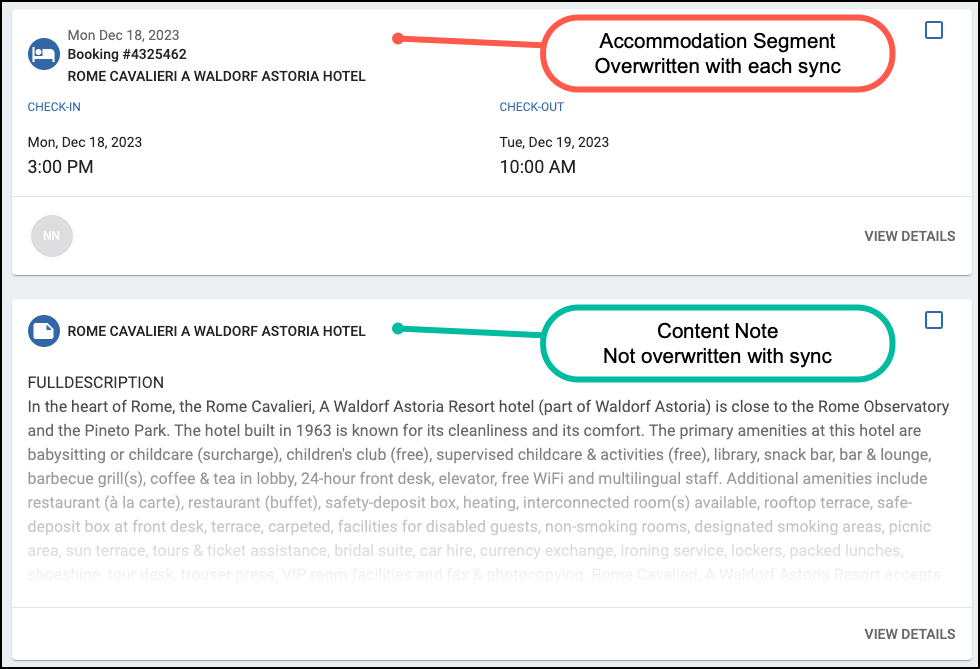
Some examples of content that WILL be overwritten if edited in TRIPS:
- changes to passenger details of a flight segment
- changes to dates
- edits or additions to content in the DETAILS section of a segment
There are a couple of exceptions to this rule. If these fields are manually updated in Trips, they will not be overwritten:
- segment fields that are not present in HELiO, such as the pick-up/drop-off time for transportation, or start/end time for an activity
- matching a segment to a vendor profile (i.e., photos and address will remain linked)
Related Articles
TRIPS Itinerary Automation: Flight Centre
This article applies to: Flight Centre Australia Flight Centre Canada Flight Centre New Zealand Flight Centre South Africa With the launch of Trips Automation, HELiO will automatically push all fully paid or cancelled bookings and updates to Trips, ...HELiO & TRIPS • Tips and F.A.Q.
What note types in HELiO will display on my TRIPS quote or itinerary? When your HELiO booking is in Quote status, Booking and Invoice notes will appear on a Trips Quote (Independent brands only). When your HELiO booking is in Definite, Firm, or Fully ...HELiO Preview & Publish | Sending Confirmed Bookings to TRIPS for Travel Associates
The process outlined below is for Travel Associates only. If you're part of a different brand, choose the link associated with your brand for specific instructions: Flight Centre (Australia, Canada, South Africa, and New Zealand) and Cruiseabout ...HELiO Preview & Publish | Sending Quotes and Confirmed Bookings to TRIPS (World Travellers)
The process outlined below is for: World Travellers If you're part of a different brand or region, choose the link associated with your brand for specific instructions: Flight Centre AU, CA, NZ, ZA, and Cruiseabout HELiO Preview & Publish | Sending ...HELiO Preview & Publish | Sending Confirmed Bookings to TRIPS (AU, CA, ZA, NZ, US)
The process outlined below is for: Flight Centre AUSTRALIA, CANADA, SOUTH AFRICA and NEW ZEALAND Cruiseabout If you're part of a different brand or region, choose the link associated with your brand for specific instructions: Flight Centre United ...